AI workflow assessment for consultants
Find the one agent worth building first.
AgentStepper helps consultants decide where AI belongs in a client's workflow. It turns what the client tells you into a step map, a recommendation for the one agent worth building first, and a design document, together in an AI Fit Assessment the client keeps. Every line traces back to what the client said.
Before you plan an agent, check whether the step needs one. Up to five questions, about a minute, no sign-in.
Why start with one agent?
Clients hear that AI agents can take over whole processes. First projects stall when they try too much at once, or put an agent where a person or a simple rule belongs.
The first agent sets the tone.
If it works, the client trusts the next one. If it fails, the whole effort loses support.
One agent can be proven.
It has a clear goal, limits, approvals, and tests, so everyone can see whether it worked.
Not every step needs an agent.
Judgment, relationships, and accountability stay with people. Fixed rules need simple automation. Saying so protects the client's budget and your credibility.
AgentStepper finds the step where an agent pays off, and tells you honestly when none does.
A consultant's workflow
Eight steps, from the meeting to the AI Fit Assessment
-
1
In the meeting, take notes
Open Meeting mode. Type as the client talks, or paste the live transcript from your call. AgentStepper suggests what to ask next and shows which parts of the workflow you have covered.
NotesSupport team call, Tuesday - tickets come in by email to Zendesk, chat thru Intercom [pasted from the live transcript] Support lead: Tier-1 agents read every ticket, tag it by topic, answer the simple ones from the help center, and send the rest to the right team. Support lead: Tagging is the mess. Topics overlap, people pick different tags, and tickets end up with the wrong team. Tier-1 agent: Billing questions go to a tier-2 specialist. They look up the account in Stripe and can issue credits up to a limit. - bugs -> someone creates a Jira issue - target = first response within 4 hours, missed on busy daysAsk next Thinking- D · Dig deeperYou said tickets end up with the wrong team. How often does that happen in a typical week?
- D · Dig deeperFor billing, what is the credit limit a tier-2 specialist can issue, and what happens above it?
- D · Dig deeperWhen the 4-hour first response target is missed on busy days, where do the tickets wait?
Covered so far- How it starts
- Steps
- People
- Systems
- Where it gets stuck
- Rules and approvals
- What goes wrong
- Unusual cases
- Success
An invented meeting. The suggestions are real AgentStepper output for these notes, replayed.
-
2
Before it ends, play it back
One click drafts what you heard, said back so the client can correct it. Every statement comes from your notes.
P · Play it back- So tickets come in by email to Zendesk and chat through Intercom. Is that right?
- So tier-1 agents read every ticket, tag it by topic, answer the simple ones from the help center, and send the rest to the right team. Is that right?
- So tagging is the mess: topics overlap, people pick different tags, and tickets end up with the wrong team. Is that right?
- So billing questions go to a tier-2 specialist, who can look up the account in Stripe and issue credits up to a limit. Is that right?
- So the target is first response within 4 hours, which is missed on busy days. Is that right?
-
3
Check the draft
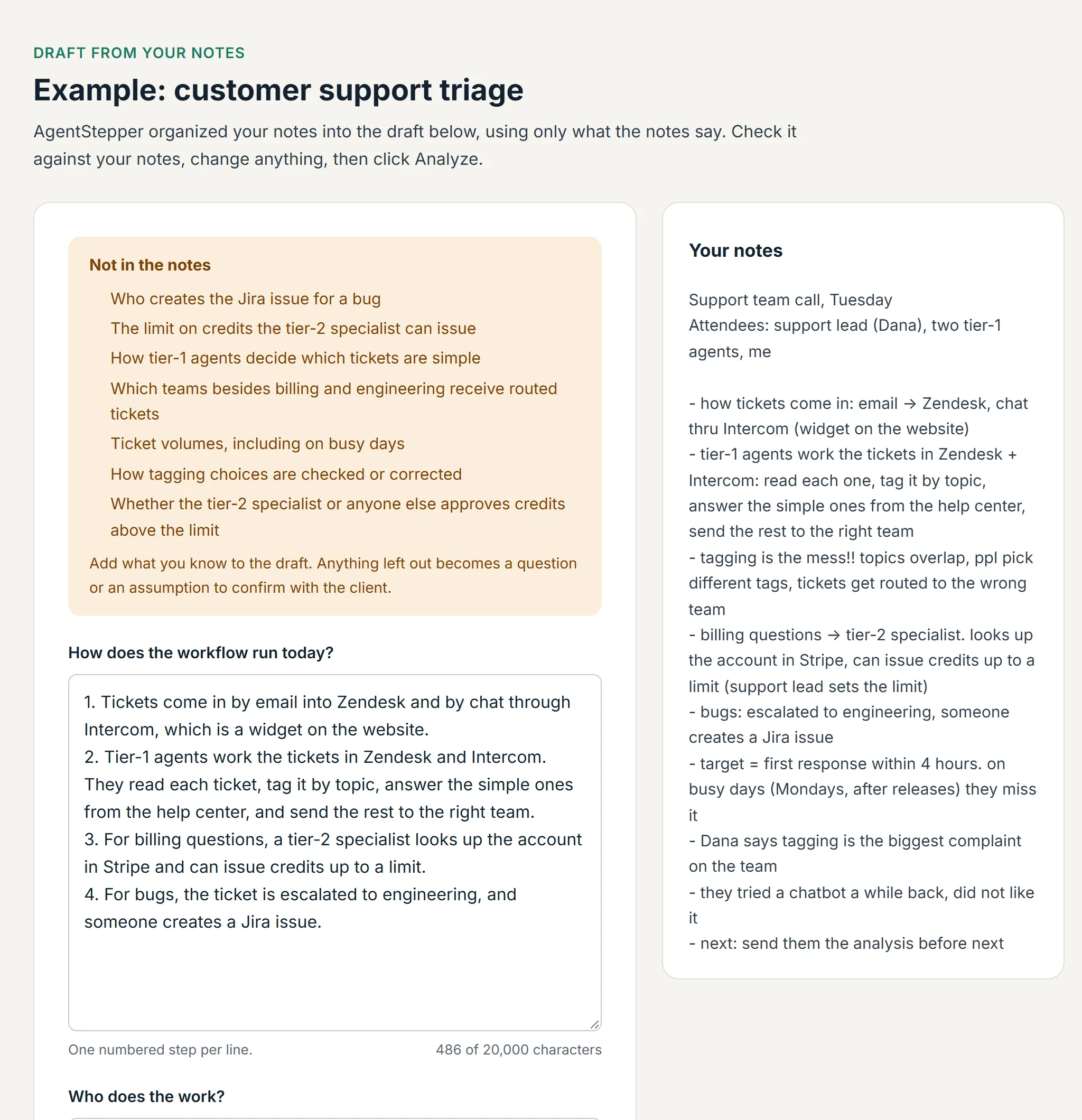
Finish the meeting and your notes become a clean draft beside the originals, with a list of what the notes did not say. Edit anything, then analyze.
-
4
Answer the Clarifier
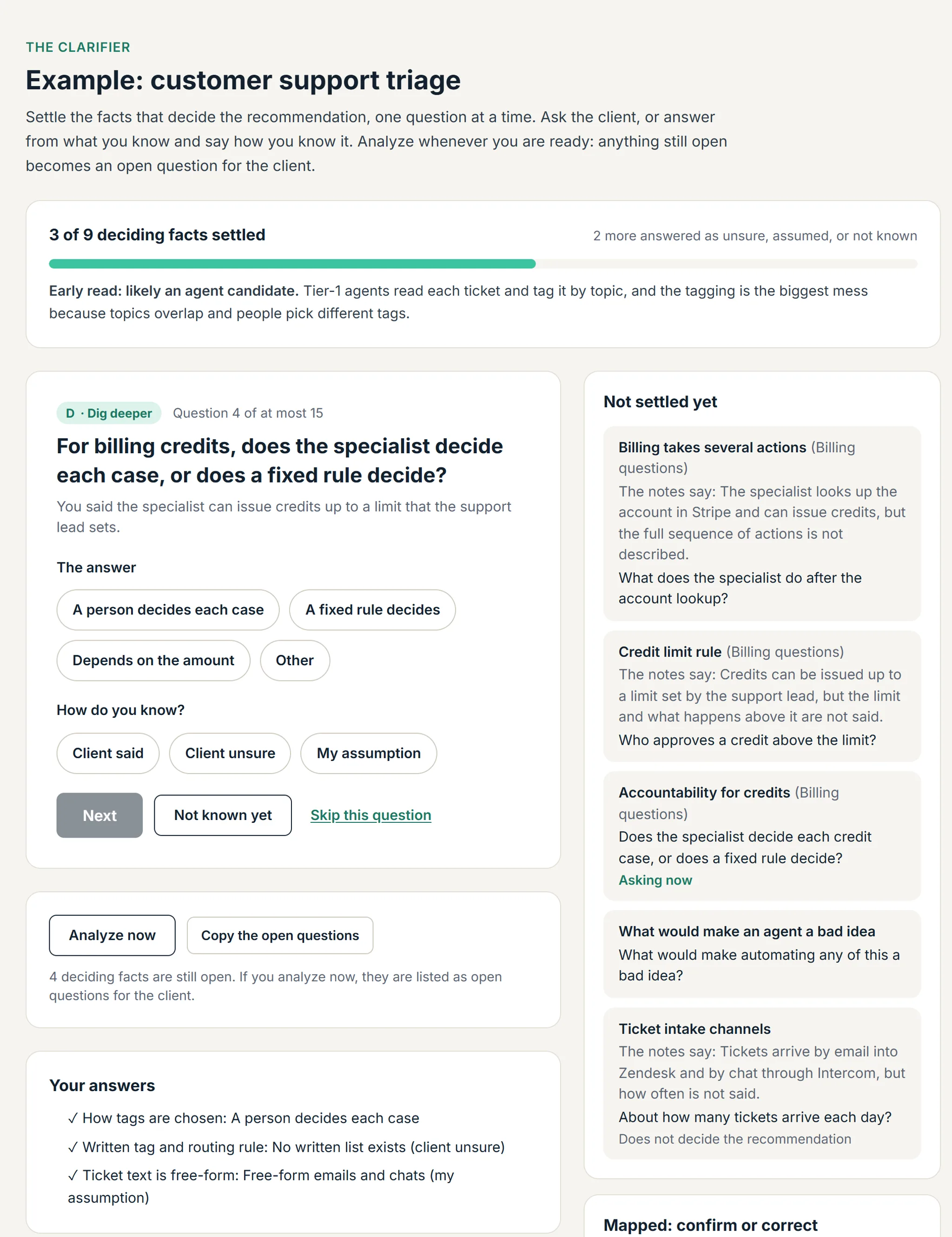
AgentStepper lists what the notes settle and asks about the rest, one question at a time, each from your last answer, until the facts that decide the recommendation are settled. Pick an answer and say how you know it: the client said it, the client was unsure, or it is your assumption.
-
5
See where AI fits
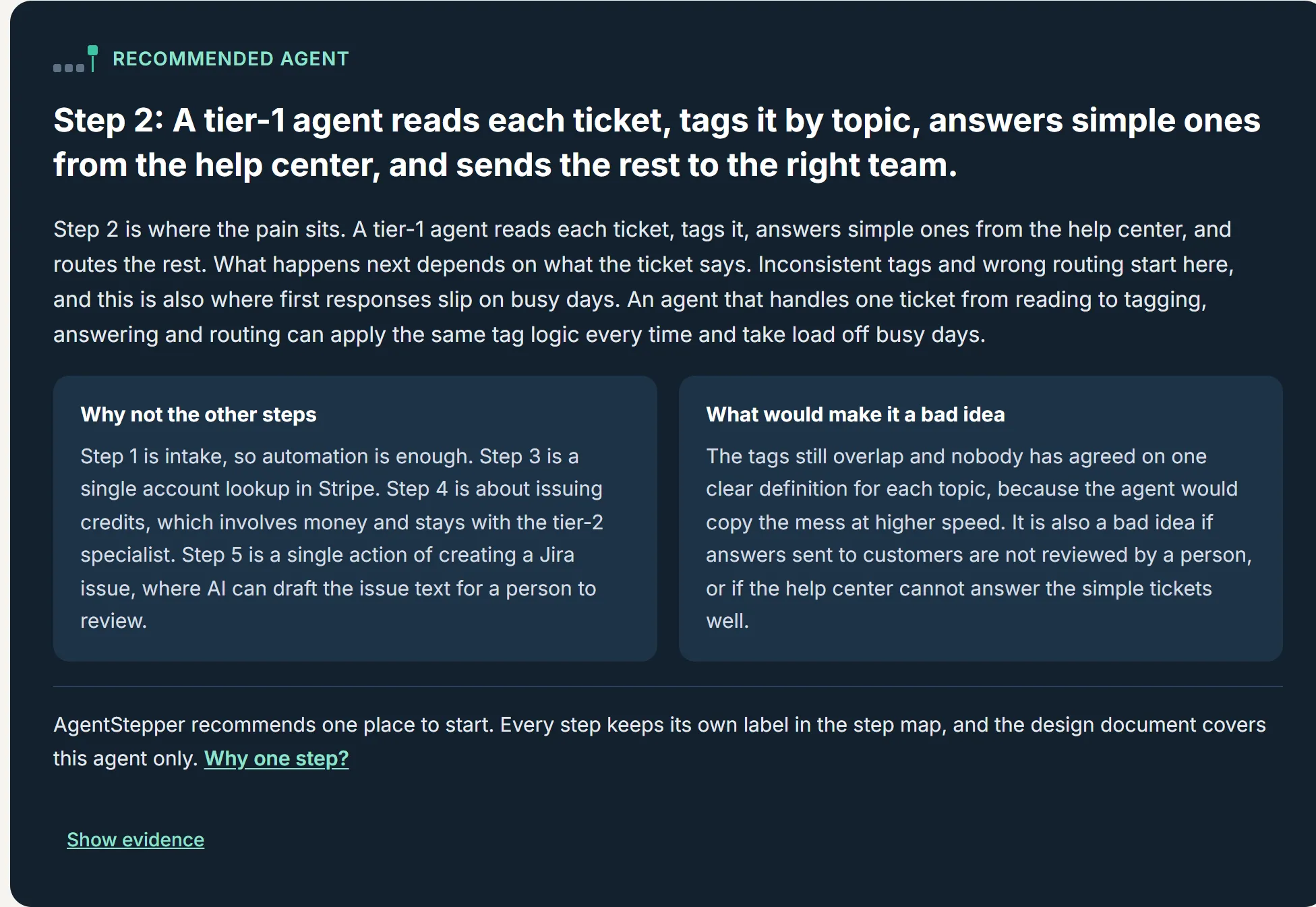
Every task in the workflow gets one label: a person, AI with a person, an AI agent, or simple rules, each with a reason tied to your notes. One step is recommended as the place to start, with why it beats the others and what would make it a bad idea.
Workflow at a glance: customer support triage (example)
-
1
Automate
Tickets arrive by email in Zendesk and by chat in Intercom.
Who: not stated -
Recommended
2
Agent
A tier-1 agent reads each ticket, tags it, answers simple ones, and routes the rest.
Who: tier-1 agent -
3
Automate
The tier-2 specialist looks up the account in Stripe.
Who: tier-2 specialist -
4
Keep human
The tier-2 specialist decides whether to issue a credit.
Who: tier-2 specialist -
5
AI-assisted
A bug is escalated to engineering as a Jira issue.
Who: not stated
- Keep human
- A person: judgment, relationships, or risk.
- AI-assisted
- AI drafts or suggests; a person decides.
- Agent
- AI pursues the goal across tools; a person approves key actions.
- Automate
- Simple rules; no judgment needed.
-
1
Automate
-
6
Get the design document
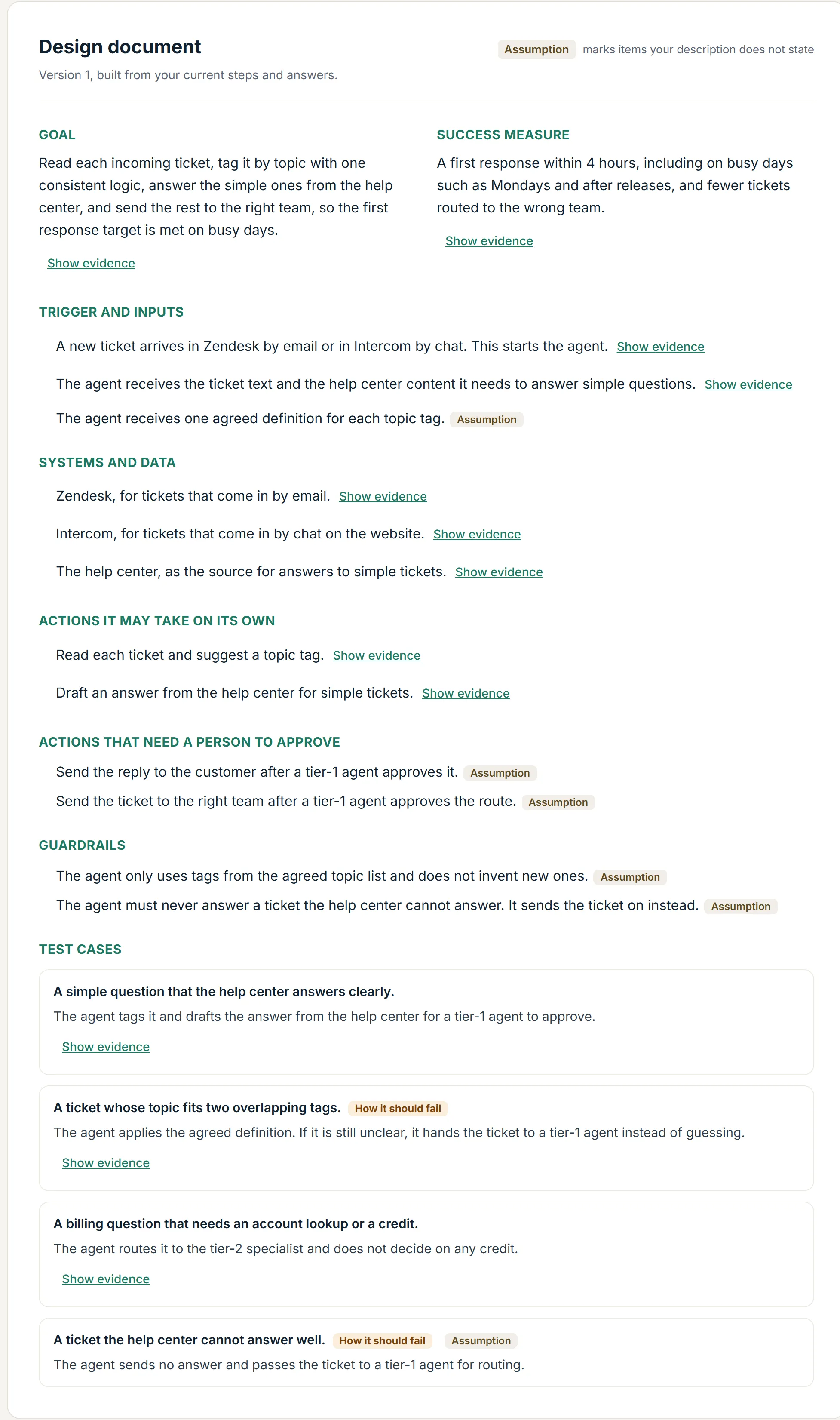
Goal, trigger, systems, what the agent may do alone and with approval, guardrails, and test cases. Anything assumed is labeled.
-
7
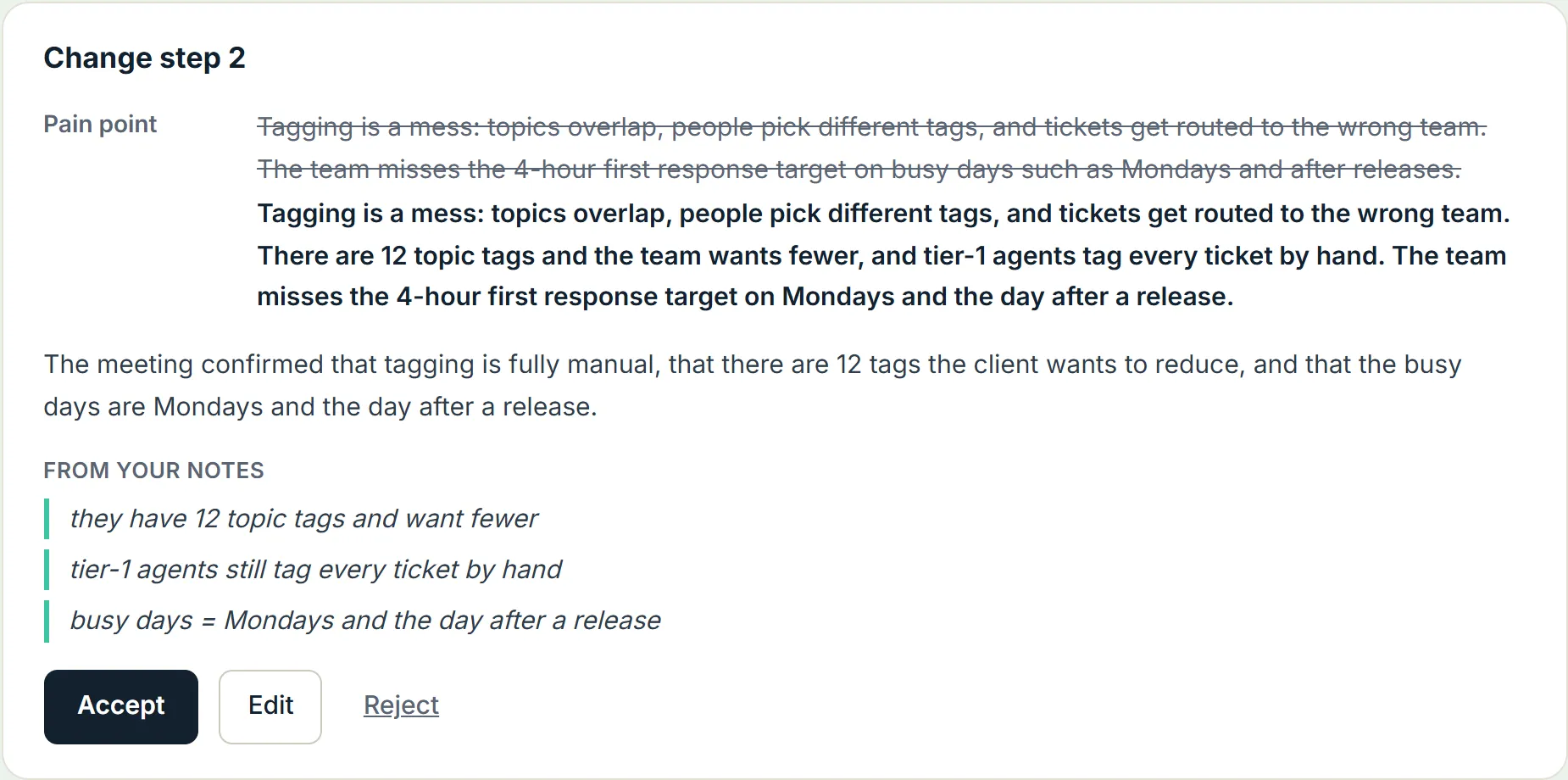
Meet again, update
The open questions become your next agenda. After the follow-up meeting, AgentStepper suggests changes, each with the words behind it. Nothing changes until you accept.
-
8
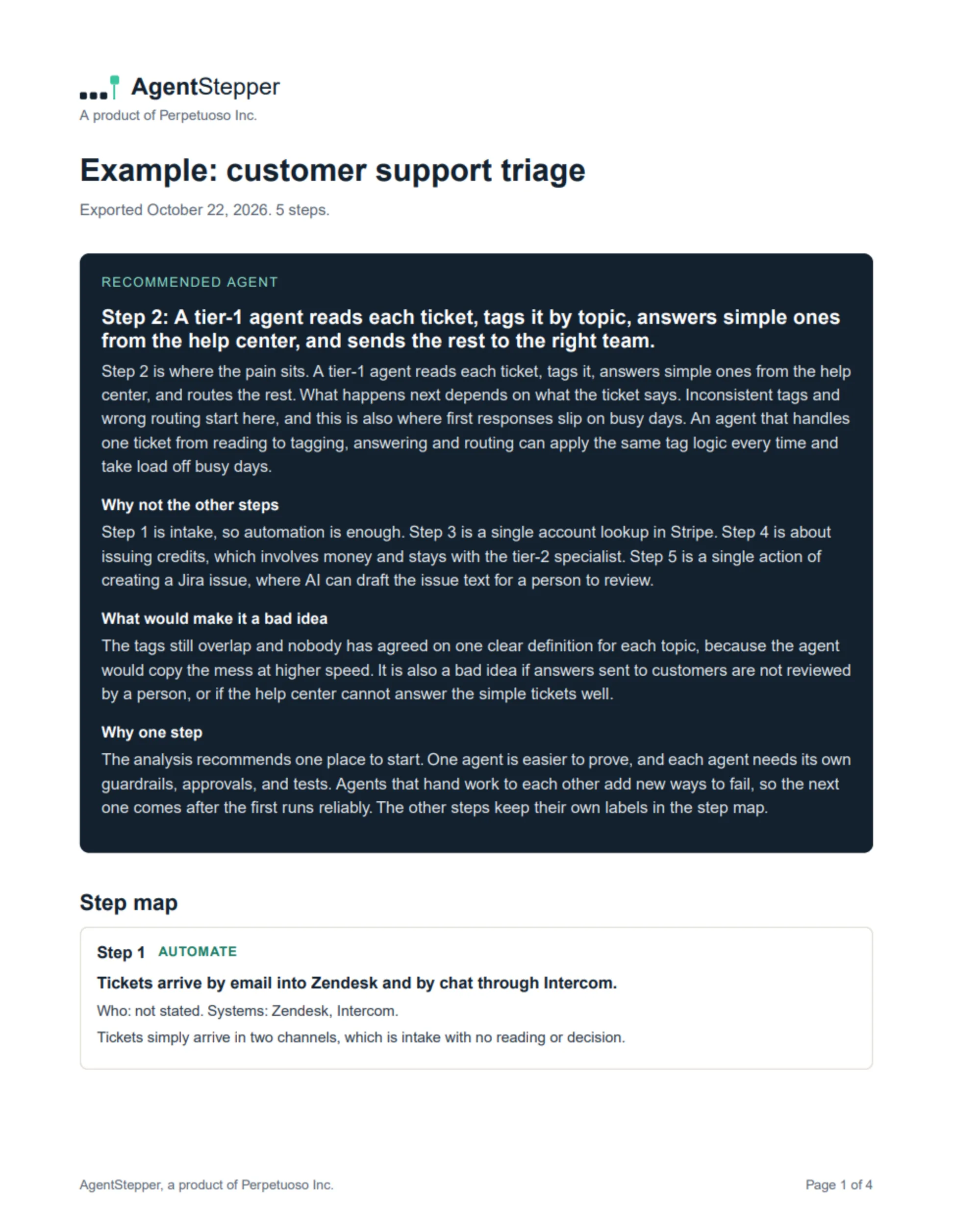
Hand over the AI Fit Assessment
A PDF with the recommendation, the step map, the design document, and what is confirmed and still open, ready for the client.
Built so you can trust every line
- Nothing invented. Systems, numbers, and people come from your notes, or they are marked as assumptions.
- Every step and design item points to the words it came from.
- Roles, never names.
- You decide. Suggestions wait for you, and your edits always win.
A full sample
See the AI Fit Assessment a client receives
A complete AI Fit Assessment for a second workflow, invoice approvals: the recommendation, the step map, the design document, and the questions for the next meeting. Four of its six pages are shown. Click a page to enlarge it.
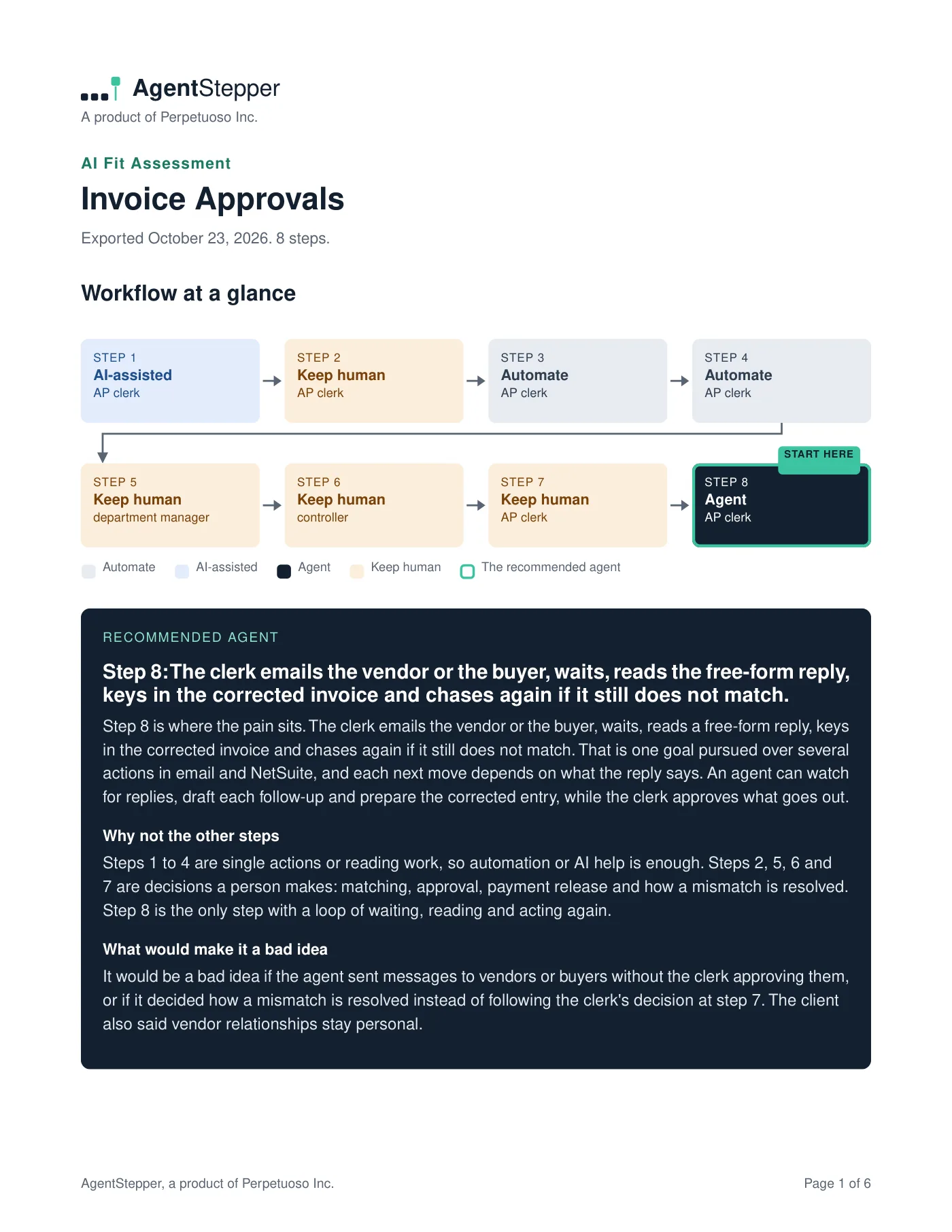
Page 1: the workflow at a glance, and the recommended agent.
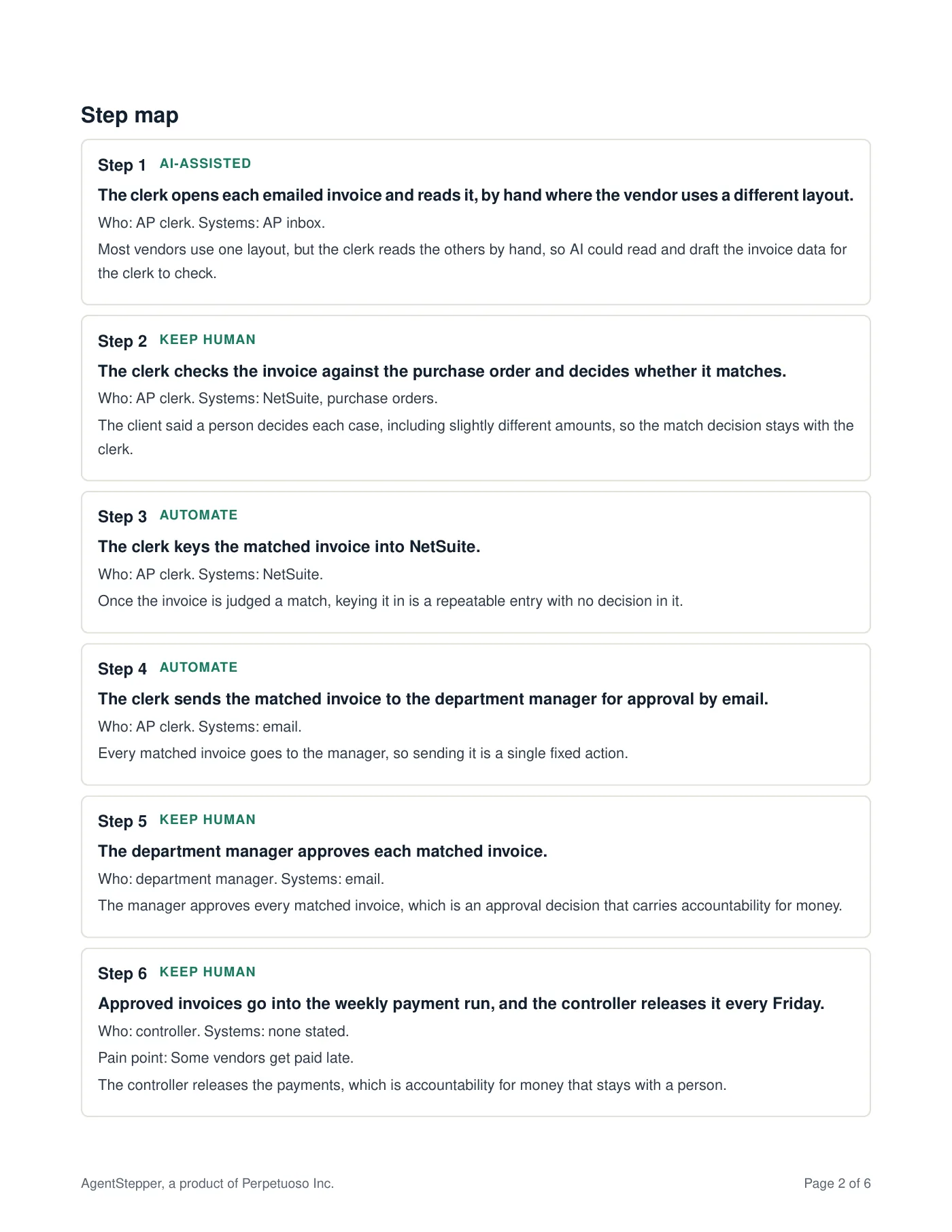
Page 2: the step map, every task labeled.
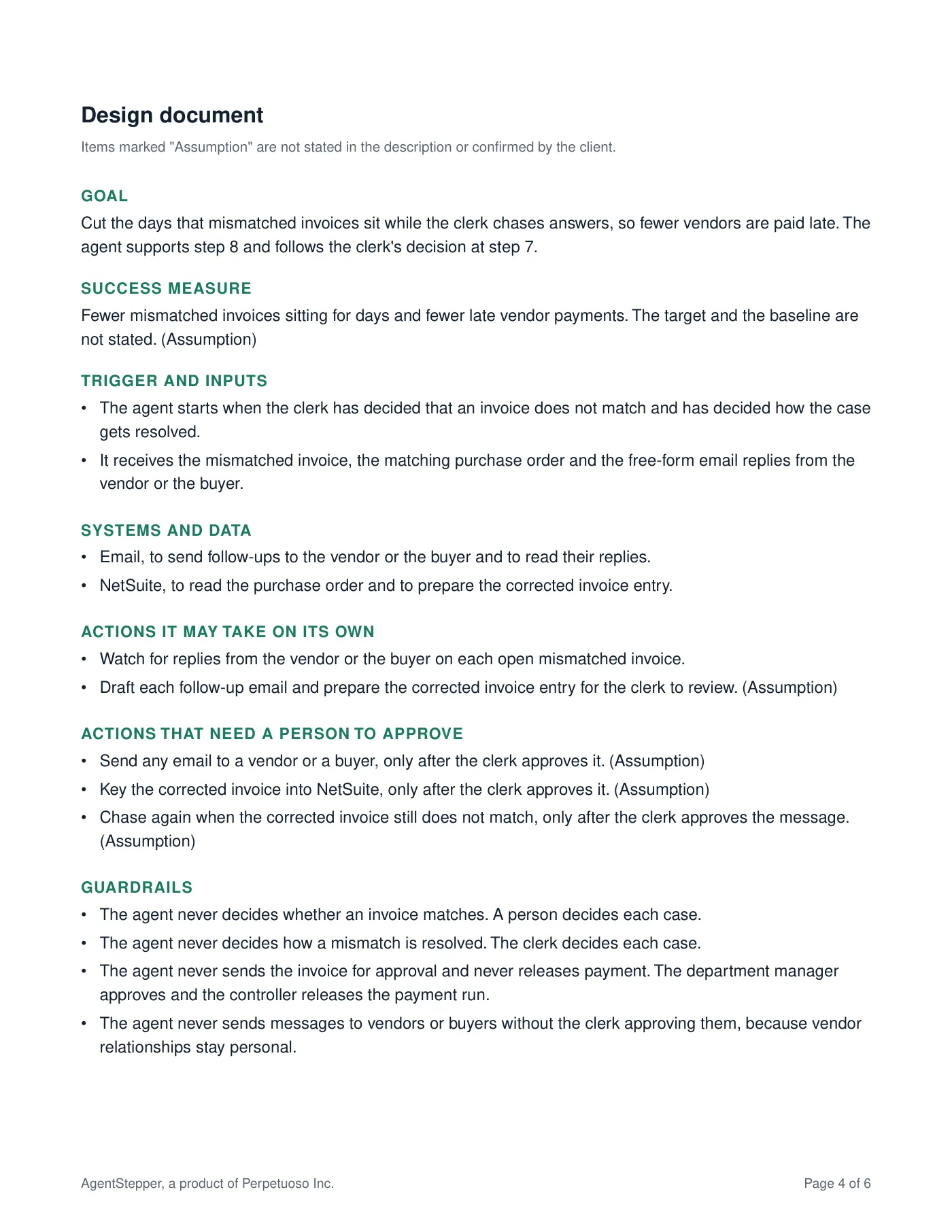
Page 4: the design document for the agent.
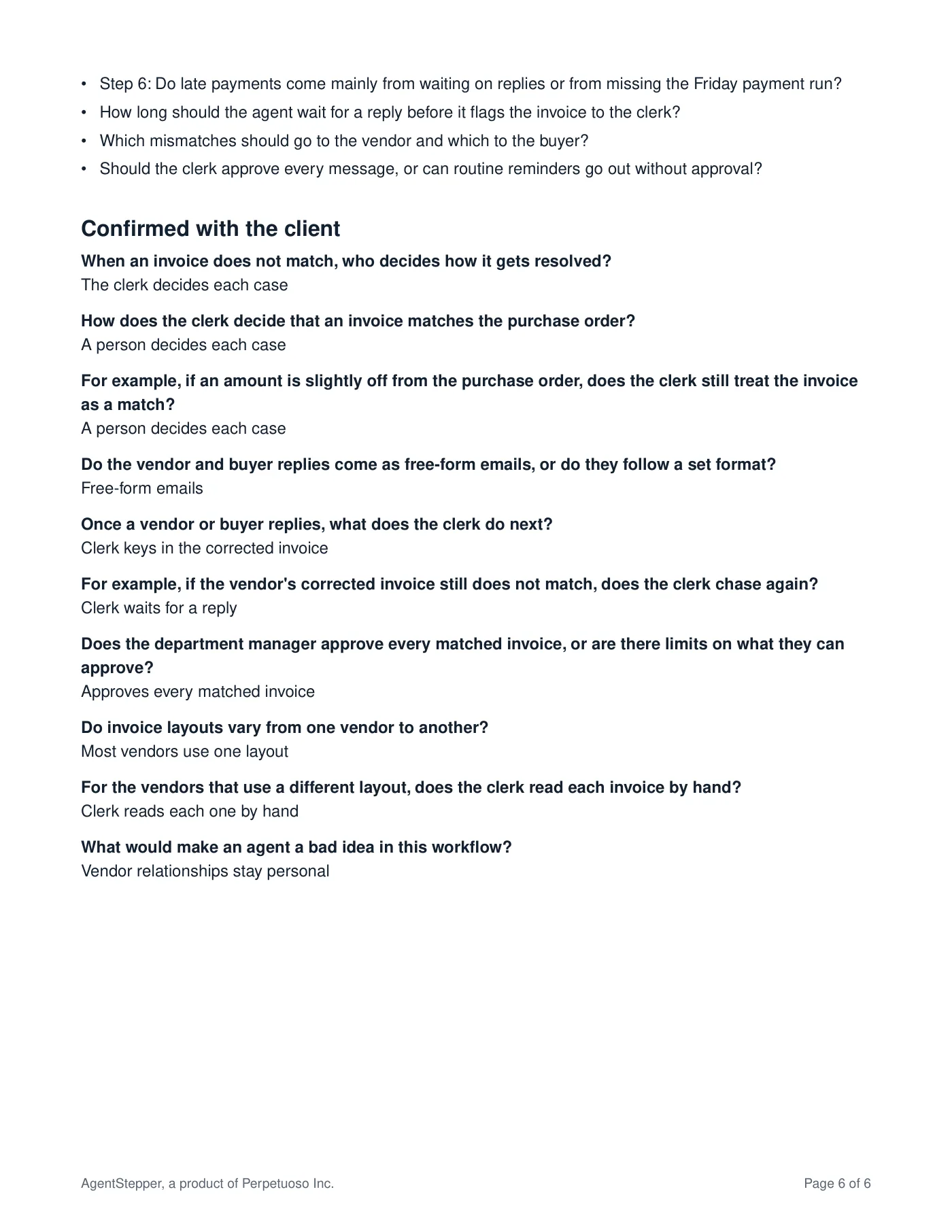
Page 6: open questions, and what the client confirmed.

Who built AgentStepper
AgentStepper was created by Chuck Nealis, whose work brings together AI, learning and development, and organizational change. Why he built it
Early access, by invitation
AgentStepper is open to a small group of consultants. Ask about access, or read how your data is handled.